
TikTok introduces a new image to video tool called TikTok AI Alive
TikTok announced on Tuesday that it has introduced its first image to video AI feature. This feature is called TikTok AI Alive and allows photos to be turned into videos for use in TikTok Stories. This function is available only through TikTok’s Story Camera, and it is understood that AI can be used to create short form videos.
For example, if you use a photo of a seaside view with clouds in the sky, TikTok can generate effects such as changing sky colors, moving clouds, and even sounds of ocean waves. This feature was introduced within a few years after TikTok launched its text to image AI feature inside the application. As Instagram has added features such as text to image generation and customizable AI generated stickers, TikTok has also added the ability for users to create videos from photos.
Stories that use AI features will include AI generated labels to inform users that AI was used. In addition, C2PA metadata will be embedded, so even if the AI generated video is downloaded or shared to platforms outside of TikTok, it will still indicate that it is an AI generated video.
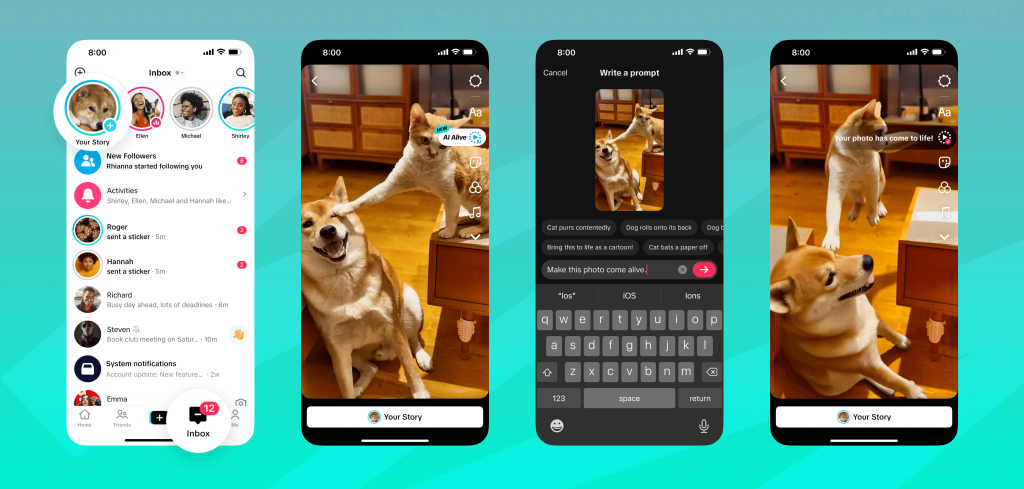
Image: TikTok
“We always prioritize safety, and the same applies to our AI innovations. Because this technology enables new forms of creative expression, we have conducted extensive testing to ensure trust and safety for our community. To prevent content that violates company policies, uploaded photos, prompts, and AI Alive videos will be reviewed using moderation technology before being shown to creators,” TikTok stated in a blog post.
It was also mentioned that users can report an AI Alive Story shared by a creator if, after the final safety check, they believe it violates TikTok’s rules.
To use TikTok AI Alive
- Open the Story Camera by tapping the blue “+” icon on the Inbox page or Profile page.
- Select a photo from the Story Album.
- The AI Alive icon will appear on the right toolbar of the Photo Edit page.
- After creating and posting an AI Alive Story, users will be able to view it in the For You and Following feeds.