
TikTok is one of the most popular entertainment platforms in the world, including in Myanmar, with over 1 billion users globally. It fosters creativity and community for a diverse range of users, creating a safe, inclusive, and authentic environment. As TikTok has become one of the top platforms for general users, content creators, celebrities, and businesses in Myanmar, we want to share a few things worth knowing to help you connect with TikTok’s vibrant community. Whether you enjoy watching entertaining videos or creating your own, this guide will help you get the most out of TikTok.
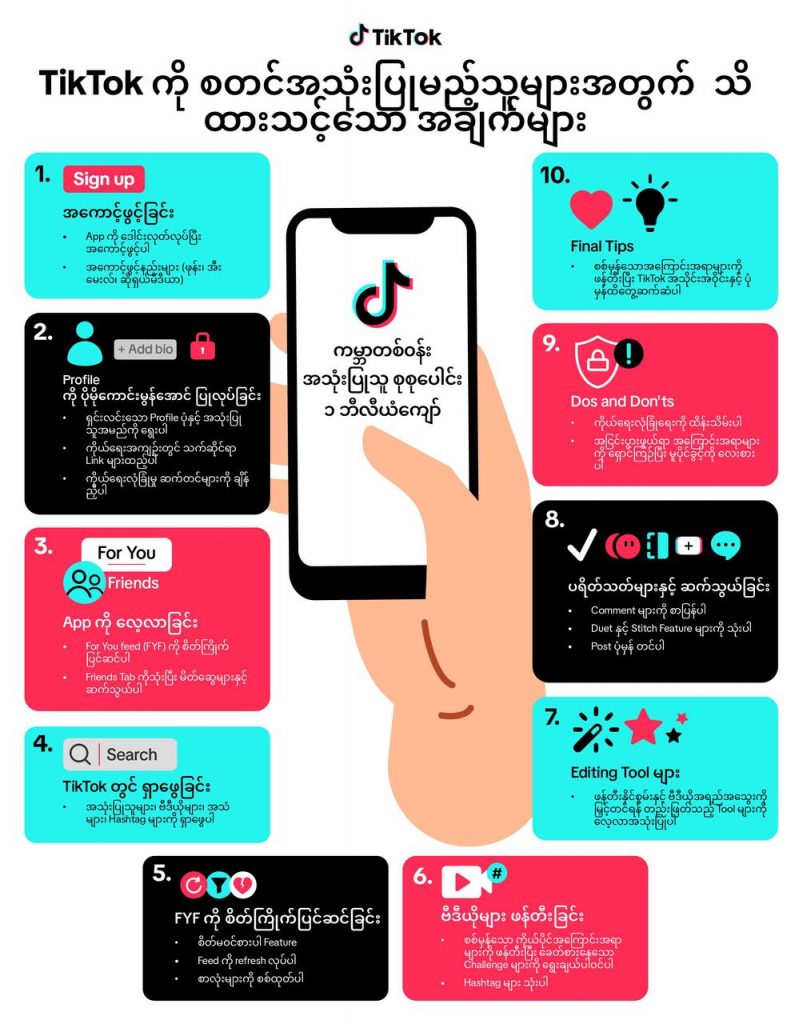
Image: TikTok
Creating an Account
You can set up a TikTok account quickly and easily as follows:
1. Download TikTok from the Google Play Store or the App Store.
2. Open the app.
3. Tap Profile at the bottom right.
4. Choose how you want to sign up — using your phone number, email address, or a social media account such as Facebook, Google, or Twitter/X.
Optimizing Your Profile
- Profile Photo and Username
- Choose a clear profile photo and username that reflect who you are.
- Bio
- Write a bio that describes who you are and the kind of content you create. You can also add links to your other social media accounts and websites.
- Privacy Settings
- Review and adjust your privacy settings to control who can view and comment on the videos you post.
Exploring the App
- For You Feed (FYF)
- When you open TikTok, the For You Feed (FYF) is the first thing you’ll see — videos shown based on what you’ve liked, shared, or commented on before. In other words, the more you interact, the more FYF adapts to show you videos you’ll enjoy.
- Friends Tab
- Use the Friends tab to easily connect with friends on TikTok and discover other suggested accounts.
Searching on TikTok
- You can search for users, videos, sounds, and hashtags as follows:
- Tap the Search icon in the top right corner.
- Type in what you’re looking for.
- Browse the results across the Users, Videos, Sounds, and Hashtags tabs that appear.
Customizing Your FYF
- You can personalize your For You Feed (FYF) using the following features:
- Not Interested — Press and hold on a video you don’t like, and options will appear. Select “Not Interested” from among them, and TikTok will show you fewer similar videos.
- Refresh Your Feed — Pull down from the top of your FYF to refresh it and see new videos.
- Filter Keywords — Filter out specific words and hashtags so that videos containing them don’t appear in your FYF.
Creating Your First Video with Engaging Content
- Be Authentic
- Share content and perspectives you’re genuinely passionate about. Being authentic helps you build a loyal audience who supports you.
- Follow Trends
- Take part in trending challenges and sounds to get noticed. That said, make sure they suit your own style before jumping in.
- Use Hashtags
- Using relevant hashtags helps your videos reach more users. Explore trending hashtags and choose the ones that fit your video.
Using TikTok’s Editing Tools
- Try out TikTok’s wide range of filters and effects to make your videos stand out. To use them:
- Tap the “+” button at the bottom center.
- Choose your preferred video length, or select a video from your phone.
- Record your video and tap the checkmark (“✓”).
- Then customize it with effects, stickers, and filters from the panel on the left.
- Tap “Next,” adjust your privacy settings as needed, and tap “Post” to share your video.
Dos and Don’ts for New Users
Dos
- Set Up Your Account Properly
- Fill out your profile completely and choose a good username.
- Explore Trends
- Take part in trending content that suits you, without losing your own authenticity.
- Protect Your Privacy
- Adjust your privacy settings to control who can see and interact with your videos. You can choose between a private or public account, and set permissions for comments, messages, and more.
Don’ts
- Avoid Controversial Content
- Avoid content that is disturbing or controversial. TikTok has Community Guidelines in place to ensure a positive experience for all users.
- Respect Copyright
- Only use songs and content you have the rights to use. TikTok provides a large library of sounds and songs that are safe to use.
- Don’t Overshare
- Be careful not to overshare personal information publicly. Protect your privacy and safety by leaving out sensitive details.
Basic Guidance for You
You may also want to keep the following tips in mind to enhance your experience and engagement.
Community Guidelines and Content Moderation
TikTok has Community Guidelines in place to keep the platform safe and welcoming. Content that violates these guidelines may be removed, restricted, or kept out of the FYF. So make sure to create content that respects these standards.
Engaging with Your Audience
- Reply to Comments
- Reply to comments on your videos and engage with your audience. Doing so helps build a community around your content.
- Use Duet and Stitch Features
- Use the Duet and Stitch features to interact with other creators’ videos, which can help you get more visibility.
- Post Regularly
- Consistency is key. Try to post regularly to keep your audience engaged.
As you start your journey on TikTok, staying authentic and consistent while engaging with the community will help you discover your creativity. We hope this guide helps you use the platform successfully and enjoy a fun TikTok experience. To learn more about using TikTok, visit https://support.tiktok.com/en/using-tiktok.