
OpenAI has announced that it is introducing a new feature called “Custom Instructions” to make ChatGPT easier and more convenient for users. This newly introduced feature is meant to give users more control over what the AI chatbot answers. Once you set your preferences, every conversation you have with ChatGPT afterward will respond within those preferences.
Custom Instructions was announced on July 20, and starting that day, Plus Plan subscribers can begin using the beta version, with the feature expected to roll out to all users in the coming weeks.
Because this newly introduced feature can be applied across every conversation with ChatGPT, users no longer need to repeat the same instructions every time they want ChatGPT to follow them. You can also set custom instructions for a single conversation focused on one particular topic, which is quite convenient since you won’t need to give the instructions again when starting to chat. Users can edit or delete their Custom Instructions at any time before starting a new conversation. In addition, a user’s instructions will not be visible to anyone viewing a shared link. If a user is using a third-party plug-in, the model will identify and connect with plug-in developers whose plug-ins match the given instructions.
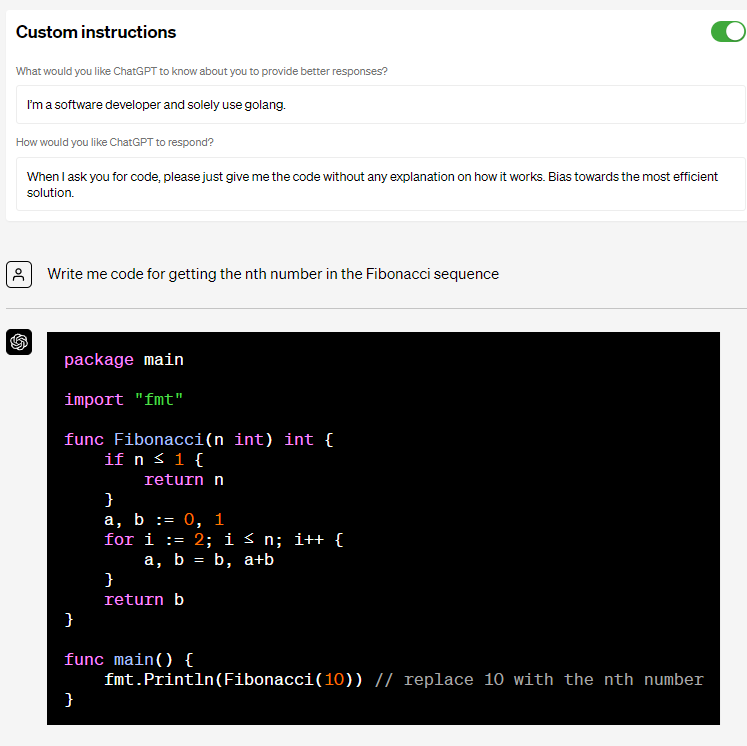
ChatGPT Custom Instructions Code Generation Example
OpenAI has also said that the Custom Instructions information users provide will be reused to help teach the ChatGPT model how it should respond, and to help improve its features going forward.
In its announcement, ChatGPT gave several examples of custom instructions, such as a teacher wanting a science lesson plan for third graders, a developer wanting code written in a language other than Python, and someone wanting a grocery shopping list for a family of six. Examples of these “Custom Instructions” announcements can be read on OpenAI’s blog post.
Plus Plan subscribers can begin using the beta version of the newly introduced Custom Instructions feature starting July 20. Those using ChatGPT through the website can enable Custom Instructions by going to Name >> Settings >> Beta Features >> Opt into Custom Instructions. iOS users can enable it via Settings >> New Features >> Turn on Custom Instructions. This beta-stage feature is not yet available in the UK or EU.
Introducing Custom instructions! This feature lets you give ChatGPT any custom requests or context which you’d like applied to every conversation. Custom instructions are currently available to Plus users, and we plan to roll out to all users soon! https://t.co/fVIM9GeYk2
Here…
— OpenAI (@OpenAI) July 20, 2023